AI motion transfer: turn one video into many.
Pick a trending motion or upload any clip, add one photo, and get the same shot starring you. The moves, timing and camera stay exactly as filmed.
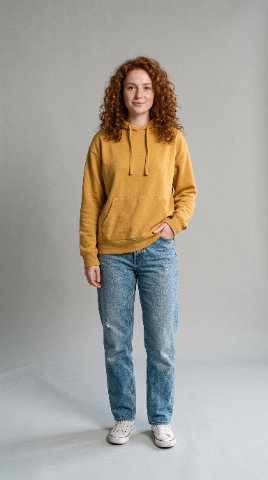 + one
photo
Real output, unedited. Both people are AI-generated.
Start from a trending motion.
No clip of your own? Pick one of the ready-made motions, add your photo and generate. Or upload any video of 2.5 to 15 seconds.
Everything on one screen.
Your motion, your cast, your settings on the left. The result next to the original on the right. This is the Motion Transfer studio in your Nano Banana dashboard.
+What is motion transfer?
AI motion transfer copies the movement of one video onto another person or scene. The model reads the body movements, gestures, expressions, timing and camera of a reference clip, then regenerates the shot with the people and places from your reference images. Unlike a face swap, the whole person is rebuilt, so face, hair, body and outfit match your photo.
- InputA Motion Library template or your clip (2.5 to 15 s) + 1 to 4 photos
- Kept from the clipBody motion, gestures, timing, camera moves, framing
- Taken from the photosIdentity, face, hair, outfit, products, places
- ModelWan 3.0 reference-to-video, 480p to 1080p, with sound
Their moves, your video.
Pick the motion
Choose a trending motion in the Motion Library, or upload a dance, an ad or a movie moment (2.5 to 15 seconds, one continuous shot).
Add your photo
A clear, front-facing photo is Image 1, the person who takes the lead role. Add up to three more for an outfit, a product or a place.
Generate
Pick 480p, 720p or 1080p. About 10 minutes later, download the MP4 with the same moves, timing and camera, starring you.
Motion transfer vs face swap vs image-to-video.
Three ways to get a person into a video, and what each one keeps.
| Motion transfer | Face swap | Image-to-video | |
|---|---|---|---|
| You provide | A clip or a template + a photo | A clip + a face | A photo + a prompt |
| Motion comes from | The reference clip, frame by frame | The original clip | The model’s imagination |
| Face, hair, body, outfit | All from your photo | Face only; body and clothes stay | All from your photo |
| Camera and timing | Copied from the clip | Copied from the clip | Described in the prompt |
| Best for | Trends, dances, recasting ads and scenes | Quick face replacements | New shots from scratch |
| On Nano Banana | Motion Transfer (Wan 3.0) | Not offered | Image to video (Seedance, MiniMax H3, FLUX 3) |
Comparing tools rather than techniques? Read the best Higgsfield Genjutsu alternatives, with Kling Motion Control, Viggle, Runway Act-Two and Wan 2.2 Animate.
What people transfer.
Trends and dances
Do the trending dance without learning it: keep the choreography and timing, appear in it yourself.
UGC ads at scale
Film one performance, recast it with each brand ambassador or persona, and keep the pacing that converts.
Movie and music video moments
Recreate an iconic shot with your cast and your own setting, with the original camera move and rhythm.
Fashion and products
Same walk, same turn, a new outfit or product from your reference images: one shoot, many variations.
Previs and storyboards
Act the scene on your phone, then transfer the blocking onto the characters and world you designed.
Characters and mascots
Give a brand character or an AI influencer real, human motion copied from a reference performance.
What is AI motion transfer?
How do I put myself in a video with AI?
Is motion transfer the same as a face swap?
What is the best motion transfer AI?
Can I keep the moves but change the whole scene?
How long can the video be?
How much does motion transfer cost?
Is there a free motion transfer AI?
Do I need my own video?
Can I use someone else’s face?
Same moves. Starring you.
Motion Transfer is included in every plan, from €29 €19.99/mo. Cancel anytime.
Only use photos of yourself or of people who agreed to appear in your video. Wan is a model by Alibaba; Nano Banana Video is an independent service by Lanne Tech.